
How to find your Ohio Legislators

Updated: Aug 24
TO FIND YOUR OHIO REPRESENTATIVE
Go to ohiohouse.gov and scroll down to “Who Represents Me?”
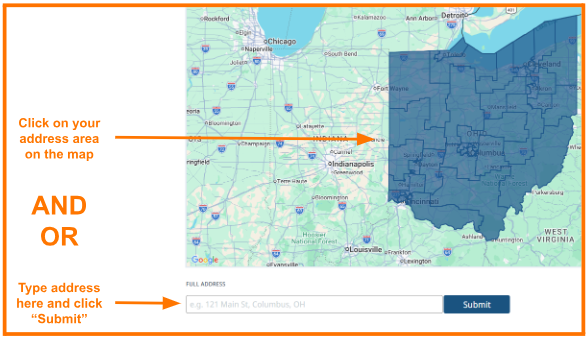
Under “Who Represents Me?”, leave the address box empty and click “Submit”; this will take you to an interactive map

On the interactive map page…
Enter your city/state and/or zip code, and click “Submit”, and/or
Using the map, zoom in and click on the area of your address

Click on your representative’s District # or Name; this will take you to their homepage
On your representative’s homepage, click “Contact” in the upper right corner

Complete the information, click next to “I’m not a robot”, and click “Send” at the bottom of the page
TO FIND YOUR OHIO SENATOR
Go to ohiosenate.gov and scroll down to “Who Represents Me?”
Under “Who Represents Me?”, leave the address box empty and click “Submit”; this will take you to an interactive map

On the interactive map page…
Enter your City, State and/or zip code, and click “Submit”, and/or
Using the map, zoom in and click on the area of your address
Click on your representative’s District # or Name; this will take you to their homepage
On your representative’s homepage, click “Contact” in the upper right corner

Complete the information, click next to “I’m not a robot”, and click “Send” at the bottom of the page

